Memory Latency and Memory Bandwidth: Different Metrics, Different Outcomes
Memory specifications are often reduced to a few eye-catching numbers on product pages. Higher transfer speeds are frequently presented as proof of better performance, while lower latency values are promoted as a sign of greater efficiency. Yet computers usually benefit from multiple metrics. A memory kit with exceptional bandwidth may not noticeably improve everyday responsiveness, and another with lower bandwidth but faster access times can sometimes deliver a smoother experience in specific workloads.
This apparent contradiction exists because memory bandwidth and memory latency measure two entirely different aspects of system performance. One describes how much data can be transferred over a period of time, while the other measures how quickly the processor can begin accessing that data. Understanding the distinction helps explain why memory upgrades produce dramatically different results depending on the workload, processor architecture, and software used.
Two Metrics That Measure Different Things
Although memory latency and bandwidth are often discussed together, comparing them directly is like comparing the size of a highway with the time it takes to reach it. Both influence traffic flow, but they solve different problems.
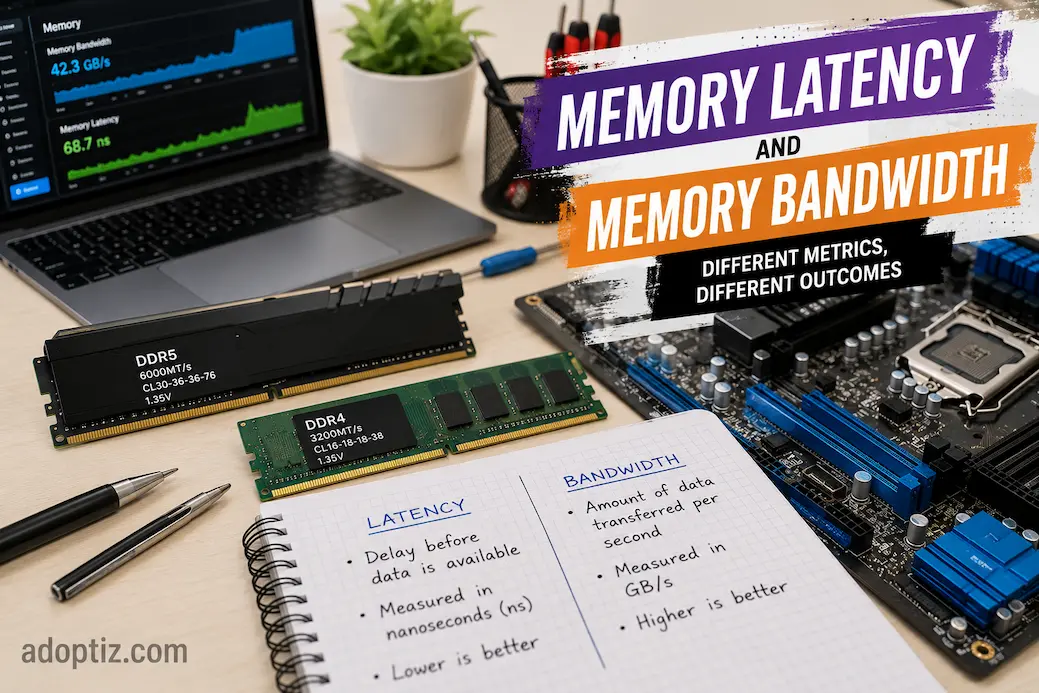
Memory bandwidth measures the amount of data that can move between system memory and the processor within a given period. It is commonly expressed in gigabytes per second (GB/s) and becomes increasingly important when large amounts of information must be transferred continuously.
Memory latency, on the other hand, measures the delay before data begins moving after the processor requests it. Even if memory can transfer enormous amounts of data every second, the processor must first wait for the initial response. That waiting time can influence how responsive certain applications feel, especially when they repeatedly access small pieces of information.
Instead of competing with each other, these two characteristics work together. A balanced memory subsystem attempts to provide both adequate transfer capacity and minimal waiting time.
A Simple Analogy
Imagine filling a large water tank.
- Bandwidth is the width of the pipe carrying the water.
- Latency is the time it takes before water starts flowing after opening the valve.
A wider pipe fills the tank faster once water is moving, but if several seconds pass before any water appears, the initial delay still affects the overall process. Computer memory behaves in much the same way.
Understanding Memory Bandwidth
As processors have gained more cores and software has become increasingly parallel, the amount of information moving between memory and the CPU has grown substantially. Modern applications frequently process large images, high-resolution video, scientific datasets, virtual machines, and complex simulations. These workloads continuously stream data, making transfer capacity a significant factor.
Higher memory bandwidth allows more information to travel simultaneously. Instead of waiting for one transfer to complete before beginning another, the processor can receive larger amounts of data within the same period. This reduces bottlenecks during workloads that constantly move information between memory and the processor.
However, bandwidth improvements produce the greatest benefits only when software is capable of consuming that additional data. Applications that access relatively small amounts of memory may never approach the available bandwidth limit, making other factors more influential.
Workloads That Benefit from Higher Bandwidth
Certain tasks naturally depend on moving large volumes of information.
- High-resolution video editing and rendering.
- Scientific computing and engineering simulations.
- Large database operations.
- Virtual machines running simultaneously.
- Artificial intelligence and machine learning workloads.
- Professional content creation involving massive datasets.
In these scenarios, increasing available bandwidth often improves overall throughput because the processor spends less time waiting for continuous streams of data.
Understanding Memory Latency
While bandwidth focuses on volume, latency focuses on responsiveness. Every time the processor requests information from memory, a small delay occurs before the requested data becomes available. Individually these delays are tiny, but modern processors make billions of memory requests every second. Even slight reductions in access time can therefore influence overall system behavior.
Latency becomes particularly important when software repeatedly accesses relatively small pieces of information scattered throughout memory. Instead of transferring huge continuous datasets, these applications frequently request new memory locations, making the delay before each transfer more significant than the transfer itself.
This explains why two memory kits with nearly identical bandwidth can sometimes produce noticeably different results in certain applications. Lower latency allows the processor to begin useful work sooner, reducing idle waiting periods throughout the workload.
Why Advertised Numbers Can Be Misleading
Many users compare memory modules solely by looking at CAS latency values such as CL30 or CL40. While these figures are useful, they do not represent actual response time on their own.
True memory latency depends on multiple factors, including:
- Memory frequency.
- CAS latency timings.
- Memory controller behavior.
- Processor architecture.
- Motherboard configuration.
Looking at a single specification without considering the others often leads to incorrect conclusions. A higher-frequency memory kit with a larger CAS latency may still deliver lower real-world latency than an older, slower module because the underlying clock speed is significantly higher.
Practical Observation
While comparing several DDR4 and DDR5 systems during everyday productivity testing, I found that benchmark scores often emphasized bandwidth gains far more than typical office workloads did. Large media projects showed measurable improvements from faster memory, but routine multitasking and document editing rarely felt dramatically different. It reinforced the idea that memory performance should always be evaluated in the context of the work being performed.
Why Better Numbers Don’t Always Mean Better Performance
It is tempting to assume that memory with the highest specifications will always produce the fastest computer. In practice, performance depends on where the system’s actual bottleneck exists. If an application spends most of its time performing calculations inside the processor, increasing memory bandwidth may have little measurable effect. Likewise, reducing memory latency offers limited benefit when software continuously transfers massive datasets that already saturate available bandwidth.
Modern processors also contain sophisticated cache hierarchies designed to reduce dependence on system memory altogether. Frequently accessed information is stored in high-speed cache located directly on the processor, allowing many memory requests to be completed without accessing RAM. As cache sizes have grown, some everyday applications have become less sensitive to memory performance than benchmark comparisons might suggest.
For this reason, memory upgrades often deliver incremental rather than dramatic improvements. The greatest gains occur when the existing memory subsystem has become the limiting factor, not simply because higher specifications are available.
Finding the Right Balance Between Latency and Bandwidth
One of the most common mistakes when selecting memory is treating latency and bandwidth as competing specifications. In reality, they complement each other. A well-balanced memory subsystem delivers sufficient transfer capacity while keeping access delays low enough that the processor rarely waits unnecessarily for data.
The ideal balance depends entirely on the workload. Some applications continuously stream large datasets and naturally benefit from higher bandwidth, while others make frequent, smaller memory requests where lower latency can provide a measurable advantage. This is why memory recommendations often vary even among systems with similar processors.
Rather than asking, “Which specification is more important?”, a better question is, “Which specification is more important for the work this computer performs?”
Different Workloads, Different Priorities
| Workload | More Influential Metric | Why |
|---|---|---|
| Office productivity | Balanced configuration | Everyday tasks rarely push memory to its limits. |
| Competitive gaming | Lower latency often provides more consistent responsiveness | Games frequently access many small datasets. |
| Video editing | Higher bandwidth | Large media files require continuous data transfer. |
| Scientific computing | Higher bandwidth | Massive datasets benefit from greater throughput. |
| Software development | Balanced configuration | Performance depends on project size and development tools. |
The table should not be viewed as an absolute rule. Modern software often combines different workload characteristics, meaning both latency and bandwidth contribute to the final result.
Why Processor Architecture Changes the Equation
Memory performance cannot be evaluated independently of the processor. Every CPU architecture includes its own memory controller, cache hierarchy, and methods of retrieving information from system memory. These design differences explain why the same memory kit may produce different results when paired with different processors.
Large processor caches, for example, reduce the number of times data must be retrieved from main memory. If frequently used information remains inside the cache, memory latency becomes less noticeable because the processor rarely needs to access RAM. On the other hand, workloads that exceed available cache capacity depend much more heavily on overall memory performance.
Operating systems also contribute to this balance by attempting to keep frequently accessed data readily available. Intelligent memory management minimizes unnecessary transfers and helps applications retrieve commonly used information more efficiently.
Choosing Memory Based on Real Needs
Memory specifications should support the intended workload rather than become the primary goal of a system upgrade. Purchasing the fastest available memory rarely produces proportional performance gains if the existing configuration is already meeting the application’s requirements.
Before upgrading memory, it is worth identifying where performance limitations actually occur.
Consider questions such as:
- Does the workload process large files continuously?
- Is the processor frequently waiting for memory?
- Does the system already have sufficient RAM capacity?
- Are benchmark improvements likely to translate into everyday use?
Answering these questions often leads to more practical purchasing decisions than comparing specifications alone.
Practical Insight
During hardware upgrades, I’ve often seen users focus on replacing memory because newer modules advertised much higher transfer speeds. In many cases, however, the biggest improvement came from increasing memory capacity rather than pursuing the highest bandwidth. Eliminating frequent memory pressure had a far greater effect on everyday responsiveness than chasing benchmark numbers.
Beyond Specific Specifications
As computer performance continues to improve and applications grow increasingly complex, memory technology also constantly evolves. While newer generations of products offer improvements in efficiency and transfer speeds, specifications alone cannot fully capture memory performance. Factors such as motherboard design, processor support, firmware optimization, and application behavior influence effective memory performance.
This broader perspective helps explain why various hardware reviews report differing performance gains, even when upgrading to the same memory. Even with identical hardware configurations, different workloads will emphasize different aspects of memory performance. For instance, tests focused on interactive applications might not show significant differences, whereas tests designed to transfer large datasets will naturally demonstrate increased bandwidth.
Therefore, evaluating memory performance requires considering the entire computing environment, rather than focusing on a single metric.
Conclusion
Understanding the distinction between memory latency and memory bandwidth helps avoid common misconceptions regarding this subsystem. Latency determines the speed at which data transfer begins, while bandwidth determines the volume of data that can be transferred within a given timeframe. Since their values depend on the workload type and system design, neither specification is inherently more important than the other.
Building a system that balances processor performance, memory performance, storage speed, and software requirements is more effective than simply chasing the highest specifications. When these elements work in harmony, system responsiveness and stability during daily use—as well as benchmark results—will improve.
FAQs
1. Can higher memory bandwidth compensate for latency?
Sometimes, but not always. Even with a slight increase in latency, workloads that continuously transfer large amounts of data can usually benefit from higher bandwidth. Applications that rely on fast, frequent memory access may be more sensitive to latency.
2. Why do expensive memory modules often show subtle differences in gaming performance tests?
Many games are influenced by multiple factors simultaneously, such as cache efficiency, game engine optimization, graphics hardware, and CPU speed. Once memory performance reaches a certain level, further improvements may yield only a marginal benefit.
3. Does higher memory capacity increase memory bandwidth?
No, higher memory capacity does not automatically increase bandwidth; it simply allows the system to store more data before relying on slower storage devices. Memory speed, channel configuration, and platform performance all influence bandwidth.
4. Is lowering CAS latency always beneficial?
Generally, lowering CAS latency is beneficial, but it should not be evaluated in isolation. Actual response time depends on memory frequency and overall architecture, so it is more important to consider memory parameters holistically rather than focusing on a single timing metric.
5. Should memory upgrades prioritize speed or capacity?
For most users, ensuring sufficient RAM is a better starting point. Improvements in speed, bandwidth, or latency are more significant—and likely to result in measurable performance gains—only when the system has enough RAM to avoid frequent memory bottlenecks.