
Comprehensive Data Protection and Disaster Recovery
In the digital era, enterprise data is the most critical asset an organization possesses. From proprietary source code and financial records to customer databases and configuration files, the loss of data translates immediately into operational paralysis and financial devastation. However, a common pitfall in systems engineering is conflating different data protection mechanisms. Administrators often mistakenly believe that having redundant hard drives eliminates the need for offsite backups, or that local high availability negates the requirement for a disaster recovery plan.
To build a truly resilient IT infrastructure, one must understand that data protection is not a single software tool or hardware appliance; it is a multi-layered architectural strategy. This strategy encompasses local hardware fault tolerance, instantaneous point-in-time recovery, isolated archival backups, and geographic site redundancy. Understanding the strict boundaries and distinct purposes of RAID, snapshots, backups, High Availability (HA), and Disaster Recovery (DR) is essential for surviving everything from a single failed mechanical drive to a catastrophic site-wide ransomware attack.
The Foundational Layer: RAID (Redundant Array of Independent Disks)
The first line of defense in data protection occurs at the hardware layer within the storage chassis itself. Hard disk drives (HDDs) and Solid State Drives (SSDs) are consumable components; they possess a finite lifespan and will eventually fail. RAID is designed to ensure that when a drive dies, the server does not go offline, and no data is lost.
RAID is Not a Backup
The most dangerous misconception in IT is treating RAID as a backup solution. RAID provides hardware fault tolerance, not data protection. If a user accidentally deletes a critical database table, or if a ransomware payload encrypts the file system, the RAID controller will faithfully and instantly replicate that deletion or encryption across all the drives in the array. RAID only protects against physical hardware death.
Common RAID Levels and Their Use Cases
Different RAID configurations balance performance, capacity, and fault tolerance:
-
RAID 1 (Mirroring): Data is written identically to two drives. If one fails, the other continues seamlessly. It offers excellent read performance but halves the total usable storage capacity.
-
RAID 5 and RAID 6 (Striping with Parity): Data and parity bits are distributed across three or more drives. RAID 5 can survive one drive failure, while RAID 6 can survive two simultaneous drive failures. These levels offer high capacity efficiency but suffer from “write penalties” due to parity calculation overhead.
-
RAID 10 (Striping and Mirroring): A nested RAID level that combines the performance of striping with the redundancy of mirroring. It requires a minimum of four drives and provides the best performance for heavy database workloads, though it is the most expensive to implement.
Advanced Local Protection: Snapshots and Clones
While RAID protects against physical drive failure, logical failures—such as corrupted software updates, accidental file deletions, or database schema errors—require a different mechanism. This is where storage snapshots and clones come into play.
How Storage Snapshots Work
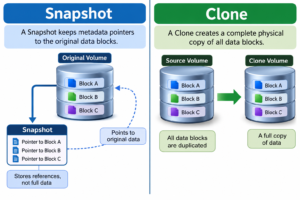
A storage snapshot is a point-in-time, virtual copy of a file system or storage volume. Modern Storage Area Networks (SANs) and hypervisors utilize Copy-on-Write (CoW) or Redirect-on-Write (RoW) mechanisms to create these snapshots instantly.
Crucially, a snapshot does not duplicate the actual data. Instead, it freezes the metadata pointers to the original data blocks. If you have a 2TB virtual machine and take a snapshot, that snapshot initially consumes zero megabytes of space. As new data is written or changed on the live system, the new blocks are saved separately, and the snapshot preserves the original blocks. This allows an administrator to instantly “roll back” a system to the exact state it was in before a failed software patch.
However, snapshots reside on the exact same physical storage array as the live data. If the SAN chassis catches fire, or the entire volume is formatted, both the live data and the snapshot pointers are destroyed. Therefore, a snapshot is not a backup.
Volume Clones vs. Snapshots
Unlike a snapshot, a clone is a complete, 1:1 bit-for-bit physical copy of a storage volume. Creating a clone of a 2TB volume requires an additional 2TB of physical storage space. Clones are highly useful for taking a production database and replicating it for the development team to run tests against without impacting live performance. Like snapshots, clones typically reside within the same local infrastructure, meaning they do not protect against site-level disasters.
True Backups and the 3-2-1 Rule
To achieve genuine data protection, data must be isolated from the production environment. A true backup is an independent, immutable copy of your data that can be restored even if the original server, the RAID array, and all local snapshots are completely eradicated.
Implementing the 3-2-1 Backup Strategy
The gold standard for data protection architecture is the 3-2-1 rule, which mandates:
-
3 Copies of your data: The primary production copy, plus two backup copies.
-
2 Different media types: Storing backups on distinct physical mediums (e.g., one copy on a local NAS appliance and another on LTO magnetic tape or cloud object storage). This protects against a firmware bug wiping out a specific brand of storage array.
-
1 Offsite copy: At least one backup must be physically separated from the primary data center. If a fire, flood, or localized power surge destroys the primary building, the offsite copy remains intact.
Air-Gapping and Immutable Storage
With the rise of advanced ransomware that actively hunts for and deletes network backup files, modern backup strategies require “air-gapping” or immutability. An air-gapped backup is physically disconnected from the network (like a tape cartridge sitting on a shelf). Immutable storage uses WORM (Write Once, Read Many) technology, mathematically locking the backup files so that no user, not even a domain administrator or a ransomware script, can modify or delete the data until a specified retention period expires.
High Availability (HA) vs. Disaster Recovery (DR)
The final layers of infrastructure resilience address how quickly an organization can restore services when failures occur. This introduces the concepts of High Availability (HA) and Disaster Recovery (DR), which solve two completely different operational problems.
High Availability: Minimizing Local Downtime
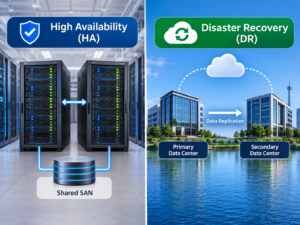
High Availability is about localized fault tolerance. The goal of HA is to ensure that if a specific component or server fails, the application continues to run with zero or near-zero downtime.
In a VMware vSphere or Microsoft Hyper-V environment, HA involves clustering multiple physical host servers together. If Host A suffers a catastrophic motherboard failure, the HA hypervisor detects the missing heartbeat. It immediately restarts the virtual machines that were running on Host A onto Host B. While the VMs may experience a brief reboot, the service is restored in minutes without human intervention. HA protects against localized, single-component failures within a single data center.
Disaster Recovery: Surviving Catastrophic Loss
Disaster Recovery (DR) assumes the worst-case scenario: your entire primary data center is gone. Whether due to a natural disaster, a massive fiber cut, or a targeted cyberattack, HA cannot save you if the building itself is offline.
DR requires a secondary geographic location—either a physical colocation facility hundreds of miles away or a cloud environment like AWS or Azure. Production data is asynchronously replicated across the WAN (Wide Area Network) to this secondary site. If the primary site falls, engineers execute a DR runbook to power on the replicated servers at the secondary site, re-route public DNS records, and restore business operations.
Designing a Disaster Recovery Plan: RTO and RPO
Building a DR site is vastly more expensive than local HA. To architect a solution that balances cost with business continuity, organizations define two critical metrics for every application:
-
Recovery Point Objective (RPO): The maximum acceptable amount of data loss, measured in time. If a database has an RPO of 15 minutes, it must be replicated to the DR site every 15 minutes. If a disaster strikes, the business loses no more than 14 minutes and 59 seconds of transactions.
-
Recovery Time Objective (RTO): The maximum acceptable downtime before the service must be back online. A mission-critical e-commerce site might have an RTO of 5 minutes, requiring an expensive “Hot Site” where standby servers are already powered on and waiting. A non-critical internal file server might have an RTO of 48 hours, allowing the use of a “Cold Site” where data must be restored from tapes before servers can be booted.
By meticulously layering RAID for physical faults, snapshots for logical errors, 3-2-1 backups for true archiving, and a robust DR plan for catastrophic events, systems engineers guarantee that an organization’s digital lifeblood remains secure against any conceivable threat.
Frequently Asked Questions
1. Why do I need a backup if my server utilizes RAID 6?
RAID 6 only protects against the physical failure of up to two hard drives. It does not protect against data corruption, accidental file deletion by users, malware infections, or site-level disasters. If a file is deleted, RAID 6 instantly deletes it across all drives. Only an isolated backup can recover that file.
2. What is the difference between a Snapshot and a Backup?
A snapshot is a set of metadata pointers referencing data blocks on the live storage array, allowing for instant point-in-time rollbacks. If the storage array is destroyed, the snapshot is lost. A backup is a fully independent, physical copy of the data stored on separate media, which can be recovered even if the original array is annihilated.
3. How does immutable storage protect against ransomware?
Immutable storage utilizes object-lock technology (WORM – Write Once, Read Many). Once the backup software writes data to the immutable repository, a time-lock is applied at the storage firmware level. Regardless of permissions, no user, application, or ransomware payload can encrypt, alter, or delete that backup file until the specified retention lock expires.
4. What is the difference between a Hot Site and a Cold DR Site?
A Hot Site is a fully operational, mirrored data center that receives synchronous or near-synchronous data replication; it can take over production traffic in minutes or seconds. A Cold Site provides the physical space, power, and cooling, but requires IT staff to manually provision servers, install software, and restore data from backups, meaning RTO (Recovery Time Objective) can be days or weeks.
Authoritative Sources & References
-
National Institute of Standards and Technology (NIST): Special Publication 800-34 Rev. 1 – Contingency Planning Guide for Federal Information Systems
-
Storage Networking Industry Association (SNIA): Data Protection and Disaster Recovery Architectures
-
Veeam Best Practices: Implementing the 3-2-1-1-0 Backup Rule and Air-Gapping
-
VMware Docs: vSphere High Availability (HA) and Fault Tolerance Mechanisms