High Availability and Disaster Recovery: Different Problems, Different Solutions
Imagine a massive Christmas sale at an online store. The website receives thousands of visitors, and it processes payments and orders every second. Suddenly, a server fails. Because another server quickly becomes operational, customers might not even notice the system switching over. This approach maximizes availability. Now imagine a different scenario: a fire, flood, cyberattack, or other incident cripples a company’s data center. The original systems are inaccessible for days. The company must use backups and alternative infrastructure to restore operations. Disaster recovery is crucial in this situation.
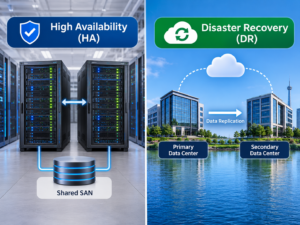
People often discuss high availability and disaster recovery together because both enhance reliability. However, they address different issues. The former focuses on preventing or minimizing downtime caused by minor disruptions, while the latter is used to recover from major outages. Understanding this distinction helps companies refine their technology strategies, mitigate business risks, and plan their infrastructure. This article introduces high availability and disaster recovery, explains why both are essential, and outlines why modern systems need them.
Why People Confuse High Availability with Disaster Recovery
Many people confuse high availability with disaster recovery. Modern IT planning involves protection against system failures, yet the methods used to resolve these failures differ. Confusion often arises because both strategies aim to maintain critical services. Companies want customers to be able to use their websites, employees to continue using business applications, and critical data to remain constantly available. However, different types of failures require different approaches.
High-availability strategies can be employed when a single system component fails but the majority of the environment remains operational. Automatically switching to another available component can resolve issues involving failed servers, network components, or temporary application failures. Disaster recovery strategies focus on major events that cause operational disruptions. Examples include data center outages, ransomware attacks, hardware damage, and the accidental deletion of critical systems.
| Approach | Main Question It Answers | Typical Failure Type |
|---|---|---|
| High Availability | How can we keep running when something fails? | Component or service failure |
| Disaster Recovery | How can we restore operations after a major disruption? | Large-scale outage or data loss |
A reliable organisation does not choose between these approaches. Instead, it understands when each one is needed and builds a strategy that matches its risks.
Two Strategies Solving Two Different Problems
A useful way to understand the difference is to imagine a building. High availability is similar to having multiple entrances, backup power systems, and spare equipment so the building can continue operating when one part fails. If one elevator stops working, another elevator is still available. The problem is handled quickly without stopping normal activities.
Disaster recovery is similar to having an emergency plan if the entire building becomes unusable. The organisation needs another location, replacement resources, and a clear process for continuing operations at another site. Both approaches protect the business, but they prepare for different situations.
1. The Problem High Availability Solves
High availability focuses on reducing downtime caused by predictable failures. Hardware components fail, software crashes happen, and network connections can experience problems. Instead of waiting for humans to repair everything manually, high-availability systems automatically continue service whenever possible. The goal is usually measured in uptime. Organisations often aim for systems that remain available almost continuously, as even short interruptions can affect customers and business operations.
2. The Problem Disaster Recovery Solves
Disaster recovery deals with events that exceed normal failure handling. These situations may require rebuilding systems, restoring data, or moving operations to another environment. The focus is not only keeping systems running but recovering them correctly after a serious incident.
Key Idea: High availability tries to avoid downtime. Disaster recovery prepares for unavoidable downtime.
Understanding High Availability
High availability is a system design approach that aims to keep services operational even when individual components experience problems. Instead of relying on a single server, connection, or application instance, high availability environments use multiple resources that can support each other. The basic idea is simple: if one part fails, another pahigh-availabilityr example, an online application may run on several servers at the same time. If one server stops responding, incoming requests are redirected to the remaining servers. Users may experience no visible interruption.
Core Principles Behind High Availability
| Principle | Purpose |
|---|---|
| Redundancy | Provides backup components |
| Failover | Moves operations when a failure occurs |
| Monitoring | Detects problems quickly |
| Load distribution | Balances work between resources |
High availability requires planning because simply adding extra hardware does not automatically create a reliable system. Components must be configured correctly so they can work together during failures.
Examples of High Availability in Daily Technology
Many services people use every day depend on high availability concepts.
- Online banking platforms using multiple application servers
- Streaming services distributing traffic across many systems
- Email platforms using redundant infrastructure
- Business applications running across multiple servers
Users usually do not see the complex systems behind these services. They only notice when those systems are not designed properly and interruptions occur.
Understanding Disaster Recovery
Disaster recovery is the process of restoring technology systems and data after a serious disruption. Unlike high availability, disaster recovery accepts that some events may cause downtime and focuses on returning operations to normal as quickly and safely as possible. A disaster recovery plan explains what happens when normal infrastructure is unavailable. It identifies critical systems, recovery steps, responsible teams, backup locations, and the order in which services should be restored.
Examples of Disaster Recovery Events
| Event | Potential Impact |
|---|---|
| Ransomware attack | Systems and data may become unavailable |
| Data centre failure | Entire infrastructure location may be lost |
| Natural disaster | Physical equipment may become inaccessible |
| Human error | Important systems or data may be deleted |
A strong disaster recovery strategy includes more than backups. Backups are important, but recovery also requires knowing how to restore applications, configure systems, verify data, and resume business operations.
Recovery Is More Than Data Restoration
One common misunderstanding is thinking disaster recovery simply means copying files somewhere else. In reality, modern businesses depend on many connected systems. A database backup alone may not be enough if the application servers, user accounts, network settings, and security configurations are unavailable. Effective disaster recovery considers the entire technology environment.
Why High Availability Cannot Replace Disaster Recovery
One of the most common mistakes organizations make is believing that high availability removes the need for disaster recovery. While high availability can protect systems from many smaller failures, it cannot protect against every possible event. A highly available system may have multiple servers, backup connections, and automatic failover mechanisms. However, these systems often exist within the same environment. If that entire environment is damaged, high availability features may no longer be useful.
For example, a company may operate several application servers in one data center. If one server fails, another server can continue providing service. This is a successful high-availability design. However, if the entire data center loses power, suffers a major network failure, or becomes unavailable because of a natural disaster, all those servers may be affectedhigh-availability.
| Situation | High Availability Response | Disaster Recovery Response |
|---|---|---|
| Single server failure | Moves workload to another server | Usually not required |
| Database corruption | May not solve data problems | Restores clean data version |
| Data centre outage | Local redundancy may fail | Moves operations elsewhere |
| Cyberattack affecting systems | May keep some services running | Restores safe environment |
This is why organisations need both approaches. High availability reduces everyday interruptions, while disaster recovery protects against larger events that require rebuilding or restoring systems.
How High Availability Architectures Work
High availability depends on carefully designed architecture. The system must know when something has failed and have another resource ready to continue operations. The design usually involves several important components working together. These components constantly monitor system health, distribute workloads, and automatically respond when problems occur.
Redundant Components
Redundancy means having additional resources available instead of depending on a single component. A system with only one critical server creates a single point of failure. If that server stops working, the entire service may become unavailable. Adding another server creates a backup option.
| Single Component Design | Redundant Design |
|---|---|
| One server handles all requests | Multiple servers share workloads |
| Failure causes downtime | Another system can continue operation |
| Maintenance requires interruption | Systems can often be maintained separately |
Health Monitoring
High-availability systems need to understand when something is wrong. Monitoring tools continuously check servers, applications, databases, and network connections. If a system stops responding, monitoring information can trigger automatic actions such as moving traffic to another available resource. Without accurate monitoring, a backup system may not activate when needed, leaving users affected by problems that could have been avoided.
Automatic Recovery Processes
Automation is a key part of high availability. Manual recovery takes time because someone must detect the problem, investigate the cause, and make changes. Automated systems can often complete these steps within seconds or minutes. However, automation must be tested carefully because incorrect failover settings can create additional problems.
Failover, Redundancy, and Load Balancing Explained
Several technologies work together to create highly available systems. Although these terms are often mentioned together, they solve slightly different problems.
Failover
Failover is the process of moving operations from a failed component to another available one. For example, if an application server becomes unavailable, a load balancer may automatically send new user requests to another healthy server.
Redundancy
Redundancy means having extra resources available. These resources may include additional servers, storage systems, network connections, or power supplies. The purpose is reducing dependency on a single component.
Load Balancing
Load balancing distributes work across multiple systems. Instead of one server handling every request, traffic is shared between several servers.
| Technology | Main Purpose |
|---|---|
| Redundancy | Provides backup resources |
| Failover | Switches operations after failure |
| Load balancing | Shares workload efficiently |
Together, these technologies improve availability and reduce the impact of hardware or software problems.
Building a Disaster Recovery Strategy
Disaster recovery requires more planning than simply creating backups. A complete recovery strategy must answer important questions before an emergency happens. When a major incident occurs, teams cannot afford to design a recovery process from the beginning. A prepared plan reduces confusion and helps organizations respond faster.
Identify Critical Systems
The first step is understanding which systems are most important. Not every application has the same business impact. For example, an online payment system may need to be restored within minutes, while an internal reporting tool may be acceptable with a longer recovery time.
| System Type | Possible Priority |
|---|---|
| Customer-facing applications | Very high priority |
| Payment processing systems | Very high priority |
| Internal communication tools | Medium priority |
| Historical reporting systems | Lower priority |
Choose Recovery Methods
Different organisations choose different recovery methods depending on their requirements and budget.
| Recovery Method | Description | Suitable For |
|---|---|---|
| Backup restoration | Recovering systems from stored copies | Smaller environments |
| Warm standby | Partially prepared recovery environment | Medium recovery needs |
| Hot standby | Continuously available duplicate environment | Critical services |
Backup vs Disaster Recovery: Understanding the Difference
Many organizations assume that having backups means they have a complete disaster recovery plan. Backups are an important part of recovery, but they are only one piece of the process. A backup is a copy of data stored separately so it can be restored if the original data is lost. Disaster recovery includes the complete process of restoring technology operations.
| Backup | Disaster Recovery |
|---|---|
| Focuses on protecting data | Focuses on restoring operations |
| Stores copies of information | Includes systems, applications, and processes |
| Helps recover lost files | Helps rebuild business services |
Why Backups Alone Are Not Enough
Imagine a company loses its main server after a hardware failure. The backup contains customer data, but the organization still needs the operating system, applications, configurations, user permissions, and network settings. Without a recovery plan, restoring the backup may take much longer than expected. Test recovery procedures regularly. A backup that has never been tested may not work when it is needed most.
Understanding RTO and RPO
Two important concepts used in disaster recovery planning are Recovery Time Objective (RTO) and Recovery Point Objective (RPO). These measurements help organisations decide how quickly systems should return and how much data loss is acceptable.
1. Recovery Time Objective (RTO)
RTO defines the maximum acceptable time a system can remain unavailable after a disruption. For example, a business application with an RTO of one hour should be restored within that time after a failure.
2. Recovery Point Objective (RPO)
RPO defines the maximum acceptable amount of data loss measured by time. If a system has an RPO of 15 minutes, backups or replication should allow recovery with no more than 15 minutes of lost data.
High Availability and Disaster Recovery in Different Environments
The importance of high availability and disaster recovery changes depending on the type of organisation and the systems being protected. A small business, a global technology company, and a public service organisation may all need reliable systems, but their requirements will not be identical. A company should not copy another organisation’s strategy without understanding its own risks. The correct approach depends on factors such as the importance of the applications, acceptable downtime, available budget, and the consequences of failure.
Small Business Environments
Small businesses often have limited IT resources, but they still depend heavily on technology. A website, accounting system, customer database, or communication platform may be essential for daily operations. For many small businesses, the biggest risk is assuming that disasters only happen to large companies. Hardware failures, accidental deletion, cyberattacks, and software problems can affect organisations of any size.
| Small Business Need | Practical Solution |
|---|---|
| Protect important files | Automated backups with regular testing |
| Reduce service interruptions | Basic redundancy for critical systems |
| Recover after major failures | Documented recovery procedures |
| Limited technical staff | Simple and manageable solutions |
A small company does not always need expensive enterprise infrastructure. However, it should understand which systems are critical and have a realistic plan for restoring them.
Enterprise Data Centres
Large enterprises usually operate complex environments with thousands of users, multiple applications, and large amounts of data. For these organizations, downtime can create significant financial and operational consequences. High availability is often implemented through multiple layers of protection. Applications may run across several servers, databases may use replication, and network systems may have backup connections. Disaster recovery becomes equally important because enterprises face larger risks. A complete data centre outage, cyber incident, or infrastructure failure can affect many departments at the same time.
| Enterprise Challenge | Protection Strategy |
|---|---|
| Large-scale application failures | Redundant application infrastructure |
| Data loss risks | Replication and tested backups |
| Regional disasters | Secondary recovery locations |
| Complex systems | Automation and monitoring |
Cloud-Based Applications
Cloud applications have changed the way organizations approach reliability. Cloud platforms provide access to distributed infrastructure, but responsibility for system design still remains with the organisation using those services. Moving an application to the cloud does norganizationally create high availability or disaster recovery. A poorly designed cloud application can still experience outages. Companies must decide how to distribute resources, protect data, and manage recovery during major incidents.
Financial Systems
Financial organizations often require extremely strong reliability because their systems support transactions, payments, and sensitive customer information. For these environments, even a short interruption can affect customers and business operations. High availability systems help prevent common failures, while disaster recovery ensures recovery from major events.
| Requirement | Reason |
|---|---|
| Fast recovery | Customers depend on continuous access |
| Data accuracy | Financial records must remain consistent. |
| Strong security | Systems handle sensitive information. |
| Regular testing | Failures cannot be discovered during emergencies |
Healthcare and Critical Services
Healthcare providers and other critical services rely on technology to support important operations. System failures may affect scheduling, records, communication, and decision-making processes. These environments require careful planning because availability and data protection are both essential. A system must remain accessible while also protecting sensitive information.
Common High Availability and Disaster Recovery Mistakes
Many organisations invest in technology but still experience problems because their planning is incomplete. Reliable systems require more than purchasing additional servers or creating backups.
- Mistake 1: Treating Backups as a Complete Recovery Plan
- Mistake 2: Creating Redundancy in One Location Only
- Mistake 3: Ignoring Human Errors
| Mistake | Better Approach |
|---|---|
| Only creating backups | Build and test full recovery procedures |
| Relying on one location | Use geographically separate recovery options |
| Ignoring staff training | Prepare people as well as technology |
| Never testing plans | Run regular recovery exercises |
Understanding the Cost of Reliability
One reason organizations struggle with high availability and disaster recovery planning is cost. Building highly reliable systems requires additional resources, including hardware, software, storage, and skilled personnel. However, the cost of downtime can often be much higher than the cost of preparation. The challenge is finding the right balance between protection and practicality.
Different Levels of Protection
| Protection Level | Characteristics |
|---|---|
| Basic | Regular backups and simple recovery procedures |
| Moderate | Improved redundancy and tested recovery plans |
| Advanced | Continuous replication and rapid failover capabilities |
| Critical | Multiple locations and near-zero downtime design |
Not every organization requires the highest level of protection. A small website and a hospital system will have very different reliability requirements. The goal is matching investment with business importance.
Why Testing Is Essential for Reliable Systems
A high-availability or disaster recovery plan that has never been tested is only a theory. Real failures create pressure, and systems often behave differently than expected during emergencies. Testing reveals weaknesses before they affect real operations.
Types of Testing
| Testing Method | Purpose |
|---|---|
| Backup restoration test | Confirms backups can actually be recovered |
| Failover test | Checks automatic switching processes |
| Recovery simulation | Practices disaster response procedures |
| Security recovery test | Checks response after cyber incidents |
Testing should be performed regularly because infrastructure changes over time. New applications, updated systems, and changing business needs can make older recovery plans outdated.
Building a Balanced Reliability Strategy
The strongest technology environments combine high availability and disaster recovery instead of choosing one over the other. High availability handles everyday failures. Disaster recovery prepares for serious events that require restoration. Together, they create a layered approach to reliability.
A Practical Planning Approach
- Identify the systems that are most important to business operations.
- Determine acceptable downtime and data loss limits.
- Choose availability and recovery solutions based on those requirements.
- Document procedures clearly.
- Test the plan regularly and improve it after each review.
A good reliability strategy is not about preventing every possible failure. No system can guarantee that nothing will ever go wrong. Instead, the goal is reducing the impact of failures and recovering effectively when problems occur.
Expert Tip: The best recovery plan is the one your team has tested and knows how to execute.
The Future of High Availability and Disaster Recovery
Technology environments are changing quickly. Businesses now depend on cloud platforms, distributed applications, automation systems, and remote operations more than ever before. These changes have created new opportunities, but they have also introduced new reliability challenges. Traditional approaches that focused only on individual servers are no longer enough. Modern systems often operate across multiple locations, services, and platforms. As a result, high availability and disaster recovery strategies are becoming more flexible, automated, and intelligent.
Automation-Driven Recovery
Automation is becoming a major part of modern reliability planning. Instead of relying entirely on manual actions during failures, organizations are using software-based processes to detect problems and respond faster. Automated systems can monitor infrastructure, identify unusual behavior, move workloads, restore services, and notify responsible teams. This reduces the time between detecting a problem and beginning recovery.
| Traditional Approach | Modern Automated Approach |
|---|---|
| Manual problem detection | Continuous monitoring and alerts |
| Human-controlled recovery steps | Automated recovery workflows |
| Longer response times | Faster reaction to failures |
| Limited testing frequency | Regular automated testing |
Cloud-Based Disaster Recovery
Cloud technology has changed disaster recovery by making alternative infrastructure easier to access. Organisations no longer always need to maintain a complete secondary physical data centre. Cloud-basedOrganizationsutions allow companies to store backups, replicate systems, and createcenter.ry environments when needed. However, cloud adoption does not remove the need for planning. Organisations must still understand their applications, security responsibilities, recovery requirements, and costs.
Resilience Engineering
Modern organisations are moving beyond simple failure prevention and focusing on resilience. Resilience means designing systems that can continue operating, adapt during problems, and recover effectively. This approach recognizes that failures Organizationsle in complex technology environments. Instead of assuming everything will always work perfectly, engineers design systems that can handle unexpected situations.
High Availability vs Disaster Recovery: Complete Comparison
The easiest way to understand the difference between these two strategies is to compare their goals, methods, and use cases.
| Category | High Availability | Disaster Recovery |
|---|---|---|
| Main Goal | Reduce service interruptions | Restore operations after major events |
| Problem Addressed | Component or service failures | Large-scale disruptions |
| Focus | Keeping systems running | Recovering systems |
| Typical Tools | Failover, redundancy, load balancing | Backups, replication, recovery sites |
| Response Time | Usually immediate or automatic | Depends on recovery plan |
| Main Benefit | Less downtime | Business continuity after disasters |
| Limitation | Cannot protect against total environment loss | May require planned downtime |
A mature technology strategy uses both approaches together. High availability protects normal operations, while disaster recovery provides a safety net when unexpected events exceed normal protection measures.
Reliability Planning Checklist
Organisations can use the following checklist when reviewing their reliability strategy.
| Question | Why It Matters |
|---|---|
| Which systems are most important? | Helps prioritise protection efforts |
| How much downtime is acceptable? | Defines availability requirements |
| How much data loss is acceptable? | Determines backup and replication needs |
| Have recovery procedures been tested? | Confirms plans work in real situations |
| Who manages recovery during emergencies? | Prevents confusion during incidents |
| Are systems monitored continuously? | Improves early problem detection |
Questions Every Organisation Should Ask
- What would happen if our main systems stopped working today?
- How quickly do we need services restored?
- Which information is impossible to replace?
- Have employees practised recovery procedures?
- Are our backups protected from the same risks as production systems?
Conclusion
High availability and disaster recovery are both essential parts of modern technology planning, but they are designed to solve different problems. High availability focuses on preventing or reducing interruptions by keeping systems running even when individual components fail. Disaster recovery focuses on restoring operations after serious events that affect the wider environment.
Confusing these two approaches can leave organizations with dangerous gaps. A system may survive a server failure but still be unprepared for a major disaster. Likewise, having recovery procedures without availability measures may lead to unnecessary downtime from smaller problems. The strongest strategy combines both approaches. Organisations should identify critical systems, understand acceptable downtime and data loss, build appropriate protection methods, and regularly test their plans. Reliable technology is not created by eliminating every possible failure. It is created by preparing systems, processes, and people to handle failures effectively when they occur.
FAQs
1. Is high availability the same as disaster recovery?
No. High availability and disaster recovery are related but solve different problems. High availability focuses on keeping systems running when individual components fail. Disaster recovery focuses on restoring systems after major events such as data centre failures, cyberattacks, or large-scale infrastructure damage. A reliable organisation usually needs both because everyday failures and major disasters require different solutions.
2. Can disaster recovery prevent downtime completely?
Disaster recovery is designed to restore operations after a serious disruption, not necessarily prevent all downtime. Some recovery processes require time because systems must be rebuilt, restored, or moved to another environment. High availability is usually the strategy used to reduce immediate downtime, while disaster recovery provides a path back to normal operations after larger failures.
3. Are backups enough for disaster recovery?
Backups are an important part of disaster recovery, but they are not a complete solution by themselves. A full recovery plan must also include application restoration, infrastructure rebuilding, security checks, communication procedures, and testing. Without a clear recovery process, organisations may have data copies but still struggle to restart important services quickly.
4. Why do companies need both high availability and disaster recovery?
Companies need both because failures happen at different levels. High availability protects against smaller issues such as server failures or service interruptions. Disaster recovery protects against larger events that affect entire systems or locations. Using both creates multiple layers of protection and improves the ability of a business to continue operating during unexpected situations.
5. What is the difference between RTO and RPO?
Recovery Time Objective (RTO) measures how quickly a system should be restored after a disruption. Recovery Point Objective (RPO) measures how much data loss is acceptable. For example, a company with a very low RTO needs services restored quickly, while a company with a very low RPO needs frequent data protection to minimise lost information.
References
- National Institute of Standards and Technology (NIST) – Contingency Planning Guide for Information Systems
- National Institute of Standards and Technology (NIST) – Cybersecurity Framework Resources
- International Organization for Standardization (ISO) – ISO 22301 Business Continuity Management Systems
- Cloud Security Alliance – Cloud Security and Resilience Guidance
- The Linux Foundation – Cloud Infrastructure and Reliability Resources
- Massachusetts Institute of Technology (MIT) Computer Science Research Publications