Thermal Throttling: Performance Limits Hidden Inside Modern Hardware
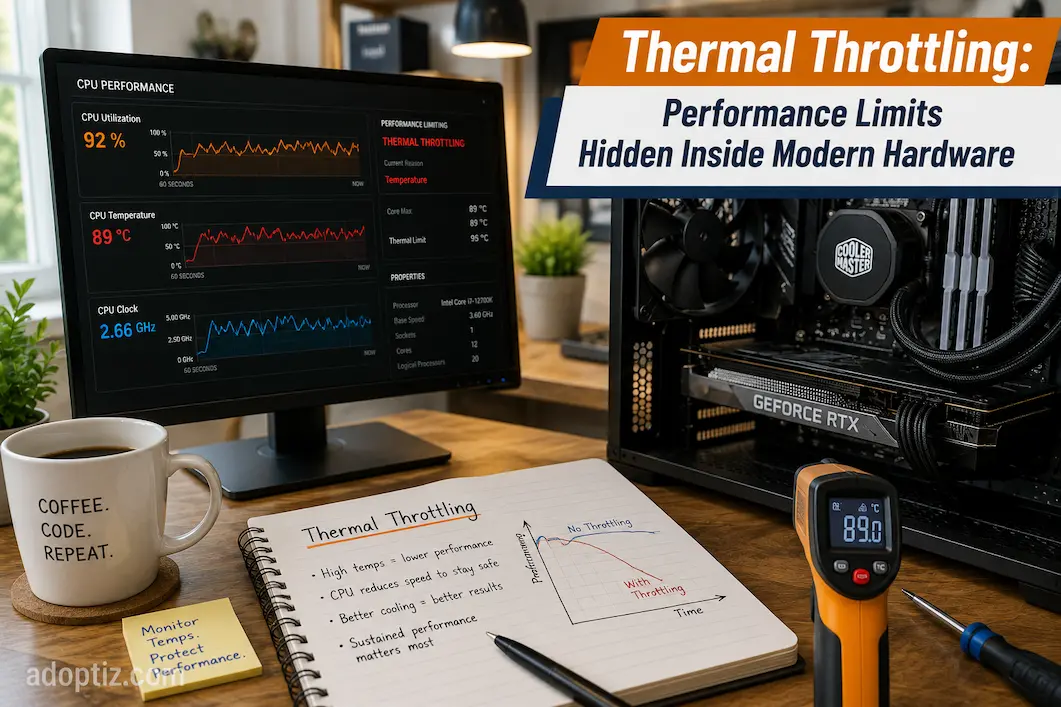
Diagnosing the issue can be difficult when a processor runs at full speed under heavy load but gradually slows down while the workload remains constant. The hardware might not be faulty, the operating system may be functioning correctly, and the program itself may remain unchanged. This occurs because the processor has reached its temperature limit and is intentionally reducing its performance. Thermal throttling is a key safety mechanism in modern computer hardware, yet it often goes unnoticed until performance begins to drop.
It is more useful to view thermal throttling as a balancing mechanism rather than a defect. Modern CPUs, GPUs, and other high-performance components aim to maximize performance while maintaining an acceptable operating temperature. To find the optimal operating speed without compromising reliability, they continuously monitor temperature, power consumption, and workload intensity. Understanding this process helps users make informed decisions when selecting, maintaining, or upgrading systems, and explains why performance fluctuates over time.
The Reasons for Thermal Throttling
All electronic components generate heat during operation, but modern computers—featuring billions of transistors and extremely high speeds—generate far more heat than ever before. There are practical limits to how quickly heat can be dissipated from a tiny silicon chip, yet manufacturers continue to push for higher performance. Without an efficient thermal management system, processors could become unstable, suffer a shortened lifespan, or even sustain irreparable damage.
Thermal throttling technology addresses this issue by enabling hardware to self-regulate. When temperatures become excessive, the processor temporarily reduces performance rather than shutting down, allowing the cooling system time to bring the temperature back under control. This allows electronic devices to continue functioning while protecting internal components from unnecessary overheating.
Compact devices make thermal management even more critical. While ultrabooks, gaming laptops, tablets, and handheld gaming devices operate within relatively small spaces, desktop computers typically have ample room for multiple cooling fans and large heat sinks. Intelligent thermal management is becoming just as important as the cooling hardware itself, as these systems often struggle to dissipate heat effectively.
Engineering Insight
Modern processors are not designed to run at maximum clock speeds continuously. They are designed to deliver the highest performance that current thermal and power conditions safely allow.
How Thermal Throttling Works
Thermal throttling is not a one-time event but a continuous control process. Modern CPU chips contain numerous digital temperature sensors. A built-in controller, operating independently of the operating system, continuously receives temperature data from these sensors to monitor the CPU’s operation.
When the CPU temperature rises under heavy load, the controller assesses whether it is approaching preset thermal limits. Instead of making a drastic adjustment all at once, the CPU typically reduces power consumption gradually by lowering the clock frequency or voltage, or by limiting the turbo frequency. These adjustments reduce heat generation while ensuring the processor can perform necessary tasks.
Once the temperature begins to drop, the processor gradually returns to a higher operating frequency, provided there is sufficient thermal headroom. By repeating this cycle multiple times per second, the hardware can maintain maximum speed without exceeding safe operating limits.
Thermal Monitoring and Temperature Sensors
For modern processors, a single temperature reading is no longer sufficient. Instead, dozens of digital sensors continuously monitor various parts of the silicon chip, including the memory controller, integrated graphics chip, cache, and CPU cores.
This distributed monitoring method does not rely on an average temperature; rather, it enables the processor to identify isolated hotspots. If a specific area heats up significantly faster than others, the processor can react before that hotspot reaches a critical temperature.
Dynamic Clock Frequency Adjustment
Dynamic frequency adjustment is one of the processor’s most powerful tools. Since light tasks such as web browsing or word processing do not require peak performance, clock speeds are generally kept relatively low. To improve responsiveness, the CPU automatically adjusts its operating frequency as the demand for computing power increases.
However, higher frequencies also result in increased heat generation and power consumption. If cooling capacity is insufficient, the processor will gradually lower the clock speed until a stable balance between heat generation and thermal efficiency is achieved.
The Relationship Between Heat, Power, and Performance
Many people believe that increasing the clock speed is the only way to improve processor speed. In reality, the relationship between thermal management and performance is far more complex. Voltage has a massive impact on power consumption, and higher frequencies often require additional voltage to ensure stability.
Even a small boost in performance can lead to a disproportionately large increase in heat generation, as power consumption rises rapidly at higher voltages. This explains why manufacturers cannot simply keep increasing the clock speed without exceeding thermal limits.
The processor therefore operates within a constantly changing balance between three closely connected factors:
| Factor | Effect on the System |
|---|---|
| Higher clock speed | Improves computational performance but increases heat generation |
| Higher voltage | Maintains stability at high frequencies but significantly increases power consumption |
| Better cooling | Removes heat more efficiently, allowing higher sustained performance |
Understanding this relationship explains why two processors with similar specifications may behave differently under identical workloads. The processor with more effective cooling often maintains higher performance because it can dissipate heat more efficiently.
What Commonly Causes Thermal Throttling?
Thermal throttling is usually the result of several factors working together rather than a single problem. Some causes are related to hardware design, while others develop gradually through everyday use.
Common Causes
- Heavy gaming sessions lasting several hours.
- Continuous video rendering or 3D modeling.
- Artificial intelligence or machine learning workloads.
- High ambient room temperatures.
- Dust blocking heatsinks or cooling fans.
- Restricted airflow inside compact computer cases.
- Laptops used on beds, couches, or blankets that block ventilation.
- Aging thermal paste reducing heat transfer efficiency.
Not every one of these situations indicates a poorly designed computer. Even high-end workstations eventually reach thermal equilibrium during sufficiently demanding workloads. Thermal throttling simply occurs earlier when cooling efficiency is reduced.
A Real-World Example
Consider two identical gaming laptops purchased on the same day. One is regularly cleaned, used on a desk, and operates in a well-ventilated room. The other spends most of its time on a blanket or couch where its intake vents are partially blocked.
Both laptops may achieve nearly identical benchmark scores during a short five-minute test because neither has accumulated much heat. After an hour of gaming, however, the difference becomes much more noticeable. The first laptop continues operating near its sustained boost frequency, while the second begins lowering clock speeds to compensate for restricted airflow. Although the hardware is identical, cooling conditions determine how much performance can be maintained over time.
Peak Performance vs. Sustained Performance
Hardware advertisements often emphasize maximum boost frequencies because they represent the highest speed a processor can achieve under favorable conditions. While these numbers are accurate, they describe temporary performance rather than continuous operation.
For many real-world tasks, sustained performance is a far more meaningful measurement. Long video exports, software compilation, engineering simulations, and extended gaming sessions may keep hardware under heavy load for thirty minutes or several hours. During these workloads, cooling capacity gradually becomes the limiting factor instead of processor capability alone.
Comparing the Two
| Peak Performance | Sustained Performance |
|---|---|
| Lasts seconds or a few minutes | Maintained for long workloads |
| Depends mainly on available thermal headroom | Depends mainly on cooling efficiency |
| Commonly seen in short benchmarks | Better reflects real-world productivity |
| Uses maximum boost frequencies | Uses stable operating frequencies after temperatures stabilize |
This difference explains why experienced hardware reviewers perform extended stress tests rather than relying solely on short synthetic benchmarks. A processor that briefly reaches exceptional clock speeds may not necessarily deliver the best long-term performance if its cooling solution cannot support those speeds consistently.
Recognizing Thermal Throttling in Everyday Use
Unlike hardware failures, thermal throttling rarely produces error messages or system crashes. Instead, it usually appears as a gradual decline in performance during sustained workloads. A game that initially runs at a smooth frame rate may begin showing occasional slowdowns after thirty or forty minutes. Similarly, a video rendering project might start quickly but take longer to complete as temperatures stabilize.
These symptoms can easily be mistaken for software bugs or aging hardware, but they often point to a cooling system that has reached its practical limit. Observing when performance changes occur is usually more informative than looking at a single temperature reading.
Typical Signs of Thermal Throttling
If several of the following symptoms occur together, thermal throttling may be the cause:
- Performance decreases only during prolonged workloads.
- Cooling fans remain at high speed for extended periods.
- Clock speeds drop while processor temperatures remain high.
- Performance improves after the system cools down.
- Long benchmark tests produce lower scores than short ones.
Not every slowdown indicates thermal throttling, but these patterns provide a useful starting point when diagnosing performance issues.
Common Misconception
A processor reaching 90–95°C does not automatically mean something is wrong. Many modern CPUs are designed to safely operate at these temperatures. What matters is whether performance begins decreasing because the processor has reached its thermal operating limits.
Can Thermal Throttling Be Reduced?
Thermal throttling cannot be eliminated entirely because every processor has defined thermal and electrical limits. However, improving cooling efficiency allows hardware to maintain higher performance for longer periods before those limits are reached.
Many users assume expensive upgrades are the only solution, but routine maintenance often provides meaningful improvements. Dust buildup, poor airflow, and neglected cooling systems can gradually reduce performance without attracting much attention.
Practical Ways to Improve Cooling
Simple maintenance can often restore lost cooling performance.
- Clean dust from fans and heatsinks regularly.
- Keep desktop intake and exhaust vents unobstructed.
- Use laptops on hard, flat surfaces instead of soft furniture.
- Improve cable management inside desktop cases to increase airflow.
- Replace worn thermal paste when appropriate.
- Keep BIOS and firmware updated if manufacturers release thermal management improvements.
These changes may not dramatically lower peak temperatures, but they often improve sustained performance, which is ultimately what matters during demanding workloads.
Choosing the Right Cooling Solution
The appropriate cooling solution depends on how the computer is used.
| User Type | Cooling Priority |
|---|---|
| Office and web users | Standard air cooling is usually sufficient. |
| Gamers | High-quality air cooling or entry-level liquid cooling helps maintain stable frame rates. |
| Content creators | Larger coolers provide better sustained performance during long rendering sessions. |
| Workstation users | Advanced cooling solutions become increasingly important for continuous heavy workloads. |
A larger cooler does not make the processor inherently faster, but it often enables the hardware to sustain its highest practical performance for much longer.
Why Thermal Management Matters More Than Ever
Modern processors continue to deliver impressive performance gains, yet cooling technology faces unavoidable physical constraints. Manufacturers are fitting increasingly powerful hardware into thinner laptops, compact desktops, handheld gaming devices, and mini PCs where available cooling space is limited.
At the same time, workloads have changed dramatically. Artificial intelligence applications, real-time ray tracing, software development, scientific simulations, and professional content creation often keep processors under heavy load for hours instead of minutes. Under these conditions, sustained thermal performance becomes just as important as raw processing power.
Future Trends
Thermal management is becoming more intelligent with every hardware generation.
Future systems are likely to include:
- More precise per-core temperature monitoring.
- AI-assisted workload scheduling.
- Smarter voltage and frequency optimization.
- Improved chip packaging for better heat distribution.
- More efficient vapor chamber and cooling technologies.
Rather than simply increasing clock speeds every generation, manufacturers are increasingly focused on delivering higher average performance over extended workloads.
Conclusion
Because thermal throttling operates unnoticed in the background, it is often misunderstood. However, modern computers must strike a balance between long-term reliability, speed, and efficiency. Sustained performance sometimes provides a more complete picture of a computer’s capabilities than simple benchmark data; even with exceptional peak performance, a CPU’s actual output depends on its cooling system.
Understanding how thermal throttling works makes it easier to analyze performance variations, evaluate hardware benchmarks, and make informed purchasing decisions. Throttling should not be viewed as a flaw, but rather as a well-designed safety feature that allows modern processors to operate at peak performance without compromising reliability. As computer technology advances—becoming faster and more precise—effective thermal management will remain a key factor distinguishing excellent specifications from consistently excellent real-world performance.
FAQs
1. Does thermal throttling shorten the processor’s lifespan?
No; the purpose of thermal throttling is to protect the processor from accelerated wear caused by prolonged exposure to high temperatures. In most cases, it actually contributes to better hardware reliability.
2. Why does my computer only slow down after extended gaming sessions?
During gaming, the CPU and GPU operate under a continuous heavy load. As heat builds up within the system, the cooling system reaches its limit, and CPU and GPU performance may drop until the temperature stabilizes.
3. Can replacing the thermal paste improve performance?
Yes, especially in older systems where the original thermal paste has degraded. Better thermal conductivity ensures more efficient heat dissipation, thereby delaying thermal throttling during prolonged use under heavy loads.
4. Are laptops more prone to thermal throttling than desktops?
Generally, yes. Laptops have smaller cooling systems and less internal airflow, making them harder to cool during extended periods of heavy use. Desktops, with their superior cooling capabilities, typically maintain higher, consistent performance.
5. Should I focus on benchmark scores when buying a CPU?
Benchmark scores are useful, but they shouldn’t be the only consideration. Real-world workload tests, energy efficiency, thermal design, and sustained performance often provide a more accurate picture of a processor’s performance during prolonged use.