Following a DNS Request From Browser to Destination Server
DNS requires numerous systems to work together, despite its simplicity. A browser may check stored data, visit a DNS resolver, contact several DNS servers, receive an IP address, and then connect to the website server. Many internet issues can be explained by this travel. DNS behavior can cause website slowness, connection failures, and security threats. Following a DNS request’s full journey helps explain how the internet finds and distributes content.
Why Browsers Need DNS Before Connecting to Websites
Every internet-connected device utilizes IP addresses to locate network devices. These addresses allow computers and servers to communicate, but they’re hard to memorize. visits to a website with millions of visits cannot be expected to memorize a large sequence of numbers every time. DNS solves this by linking names and addresses. When a user enters a domain name, the browser must translate it into an IP address before sending the request.
When someone enters www.example.com, the browser does not immediately fetch the webpage. It first queries a DNS service, “Which server handles this domain?” The answer gives the location to continue the connection. Most people don’t notice this fast translation. Modern DNS systems briefly save prior results to speed up. This implies the browser or OS may remember the answer from a previous visit and avoid rere-look-up. DNS lookups appear when information is missing, obsolete, or unavailable. A browser may display “server not found” even if the internet connection is fine. Findability may be the issue, not the webpage.
Browser Checks Its Own DNS Information
Most DNS journeys start in the browser. Browsers often verify if they know the answer before submitting a request online. This data is a DNS cache. Caching exists because repeating questions wastes time and network resources. The browser does not need to execute a DNS query every time a user visits the same page multiple times a day. It can reuse recent data till it expires.
Time To Live (TTL) controls expiry. System TTLs indicate how long DNS records should be valid before checking again. A shorter TTL speeds up change dissemination but increases DNS inquiries. Longer TTLs reduce lookups but delay updates. If the browser doesn’t have a valid DNS record, the request goes to the OS. The OS has its own DNS cache. This allows local DNS server responses without external DNS servers. The operating system may have the necessary information if another application recently accessed the domain. Modern web browsing feels quick due to cache layers. Users complete many DNS lookups before they leave their device.
Operating System and Local Network Roles
DNS requests normally go to a configured DNS resolver when the browser and OS cannot answer. Internet service providers, company networks, and public DNS services supply this resolver. Network settings tell the OS where to send DNS queries. Users and organizations can explicitly specify DNS providers, although devices are normally provided these settings when they connect to a network. The request leaves the local device and travels the network. The computer queries DNS for the domain name’s IP address.
DNS queries are tiny and require quick connection, hence they are frequently sent using UDP. DNS may use TCP for dependability or larger answers. The request may pass through a router before reaching the DNS resolver. The router routes DNS queries between the local network and the internet. Users experience this nearly immediately. In the absence of stored information, the resolver must establish where the answer comes from.
The DNS Resolver: The Answer-Finder
The DNS resolver connects users to the DNS system. Resolvers handle the complicated search procedure for users instead of every computer on the internet contacting DNS servers. The resolver checks its cache before answering DNS queries. The resolver may have responded to the same request for another user since many people visit popular websites.
The resolver returns the IP address to the user’s device immediately if it knows the answer. This cuts communication and loading time. If the answer is unavailable, the resolver queries additional DNS servers. It does not randomly search the internet. DNS is hierarchical to efficiently find information. This hierarchy lets billions of domain names exist without a big database of website addresses. Different levels of DNS servers handle different naming system parts.
How DNS Hierarchy Helps Resolvers Find Servers
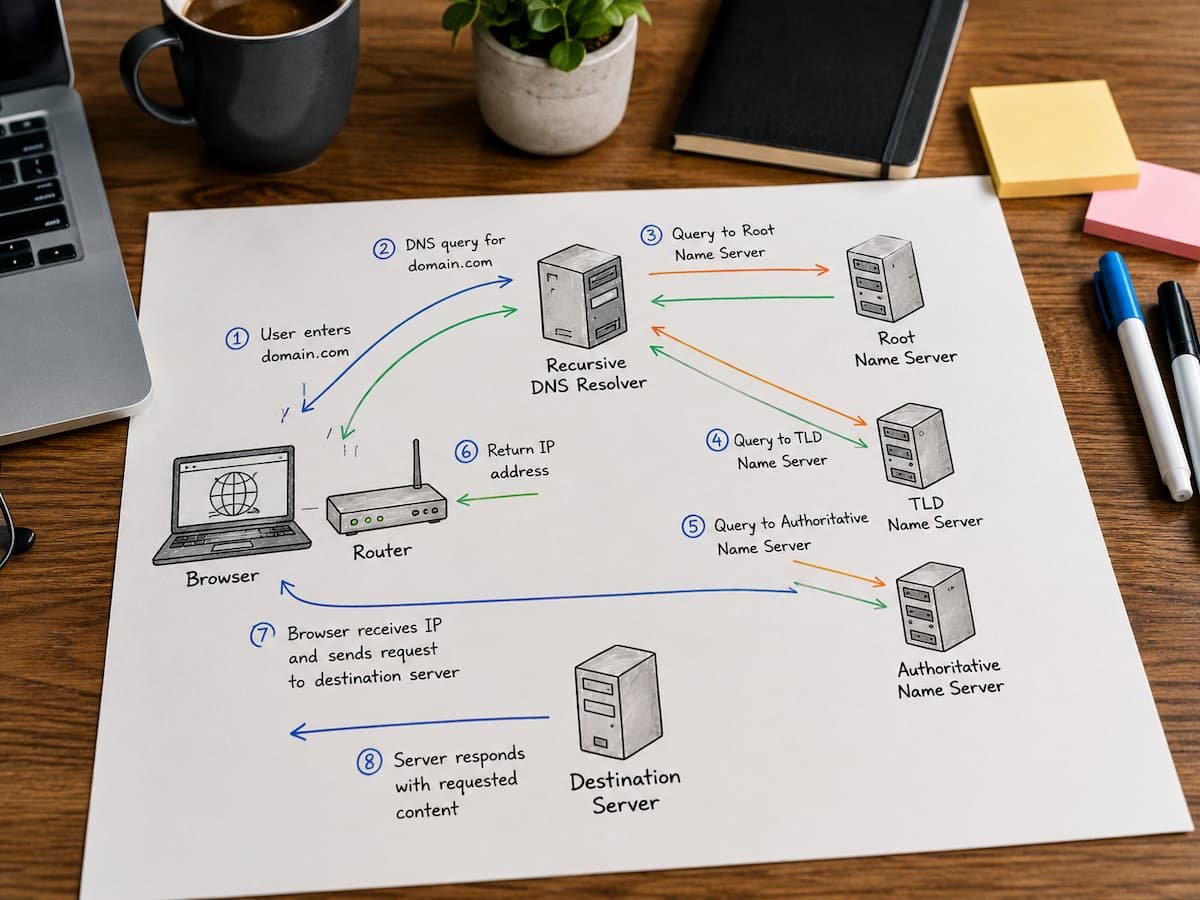
DNS resolvers examine the DNS hierarchy for answers if they don’t already have them. Each level of this system provides information to help the resolver reach its objective. Usually, contact a root DNS server first. Root servers don’t store every website’s IP. Instead, they know where to find.com,.org,.net, and country-specific domain information. If a user requests a.com website, the root server directs the resolver to the DNS servers for that domain. These are top-level domain servers.
The top-level domain server doesn’t know the final IP address either. Instead, it directs the resolver to the domain’s authoritative DNS server. This approach spreads responsibilities across multiple systems rather than centralizing internet domain information. The authoritative DNS server holds domain DNS records. These records tell the resolver where website servers, email servers, and other resources are. After receiving the correct IP address from the authoritative server, the resolver stores and delivers it to the user’s device. Caching, efficient infrastructure, and global DNS services speed up this multi-server procedure in modern networks.
Understanding Website DNS Records
DNS does more than convert domains to IP addresses. It handles domain-operation instruction records. Most people talk about the A record. This record maps a domain name to an IPv4 address so browsers can find the website server. Entering a website address usually starts a DNS lookup for this record. DNS employs AAAA records for IPv6 websites. Similar entries point to IPv6 addresses instead of IPv4.
DNS handles other internet service records. Mail exchange records (MX records) identify domain email servers. Security settings and verification information can be stored in TXT records. DNS is a foundation of internet infrastructure because of its versatility. It goes beyond “Where is this website?” It instructs internet services to communicate properly. DNS errors or obsolete records might cause problems even if the website server is working properly. Small DNS configuration errors can prevent visitors from reaching their location.
After DNS Resolution: Browser Connects to Destination Server
The DNS journey ends when the browser obtains the IP address. The browser now knows where to send the webpage request. Next, connect to the destination server. This commonly uses HTTPS on newer websites. First, the browser checks with the server to create a trusted encrypted session. This process uses TLS. Information transmitted between the browser and server is encrypted using TLS. The browser may also verify that it is connecting to the real website rather than an impersonator.
Before sending data, the browser and server must agree on communication, security, and encryption keys. After this, the browser can safely request webpage content. The browser requests resources from the server using HTTP. HTML files, photos, style sheets, scripts, videos, and other page components may be included. Requested information is returned by the destination server. At this point, DNS, networking equipment, security mechanisms, and server infrastructure reveal their collaboration.
DNS’s Role in Website Loading
DNS is only part of website loading, but it’s crucial because everything depends on finding the right destination. A browser can’t request a webpage from a server without knowing its location. The shortened website loading journey:
- The user types the domain name into the browser.
- DNS is checked by the browser.
- Operating system DNS cache check.
- DNS resolvers find domain information if needed.
- The resolver uses the DNS hierarchy to contact DNS servers.
- The IP address is returned to the browser.
- Browsers link to destination servers.
- The browser receives webpage files from the server.
- The browser creates and displays pages.
Stages depend on each other. Early failure can prevent later steps. If DNS cannot supply an IP address, the browser never reaches the website server. This is why DNS issues sometimes resemble internet issues. A user with a working network connection may not be able to access websites due to name resolution issues.
Typical DNS Issues and Their Meaning
Understanding DNS failure symptoms helps determine the cause. DNS cache issues are widespread. After a website switches servers or DNS records, a device may keep obsolete data. Users may reach the new server while others stay at the old one until stored information expires. The configured DNS resolver’s absence causes another issue. Websites may be unavailable if a device cannot communicate with its DNS service, even if other network functions operate.
Incorrect DNS records can worsen complications. If a domain points to the wrong IP address, visitors may get connection issues or be sent to the wrong server. DNS-related attacks are another issue. Attackers may modify DNS replies to lead users to fake websites. DNSSEC and encrypted DNS are becoming more crucial for security. When resolving DNS difficulties, changing DNS servers may assist, but not always. The device, local network, DNS provider, or domain settings must be considered when diagnosing the issue.
Why DNS Performance Impacts Website Speed
DNS resolution delays can influence user experience even if DNS is only a small part of page loading time. Before downloading webpage content, the browser needs the target address. Fast DNS resolution speeds server discovery. This is most obvious when viewing a website for the first time, before cached data is available.
Content delivery networks are used by modern websites. These systems employ DNS to guide users to servers that are closer or better at managing traffic. A good DNS system distributes queries and steers visitors away from down servers, improving reliability. Poor DNS settings might delay or complicate outages. Website owners need DNS for more than just technical reasons. Performance, availability, and security planning include it.
Steps to Fix DNS Issues
Many assume the internet is down when a webpage doesn’t load. DNS difficulties often occur separately from connectivity concerns. A device connected to the internet may not translate website names into IP addresses. The first step in troubleshooting is determining if the problem affects one or more websites. DNS records or server settings may be the cause of one domain failure. Local DNS resolver or network settings may be to blame if numerous unrelated websites crash at once.
Restarting network equipment may fix temporary issues, but it is not a permanent fix. By restarting routers and devices, temporary DNS records can be updated. Direct DNS resolution testing is also helpful. Network tools can verify domain name-to-IP address translation. If the lookup fails, the problem exists before the browser connects to the website server. Users can also compare DNS resolvers. The original resolver’s cache, availability, or configuration may be to blame if another DNS provider can resolve a domain.
The Value of DNS Security
DNS governs internet direction, therefore safeguarding it is crucial to online security. DNS attacks can divert users from legitimate websites without affecting their browser settings. DNS spoofing sends users to the wrong place. A person may visit a trusted website but communicate with a rogue server. DNS cache poisoning also stores inaccurate information in DNS systems. A resolver may lead many users to the wrong location until false records are removed or changed.
DNSSEC verifies that DNS replies have not been changed during transit. DNSSEC digitally signs DNS responses to verify authenticity. DNS over HTTPS and DNS over TLS safeguard DNS requests from being seen or changed over networks. By hiding browsing-related DNS requests, these methods promote privacy. Security protects against online destination-finding attacks but does not replace DNS administration.
How Modern Website Infrastructure Uses DNS
Few modern websites use one physical server. To serve global consumers reliably, large websites use many servers, cloud platforms, and content delivery networks. DNS coordinates complicated infrastructure. DNS can route visitors to different servers based on region, server availability, traffic, or business needs. Visitors in Europe may connect to a nearby server while those in other regions link to a different site. Delays are reduced and browsing is improved.
DNS also supports failover. If one server fails, DNS can divert traffic to another. Due to cache, DNS changes are not instant, but careful configuration helps enterprises maintain service availability. This is why website owners and IT teams must control DNS. Website performance and reliability depend on the server hosting its files and how well DNS directs people to it.
The Difference Between Website Visits and Findings
Many consumers think opening a webpage is one activity, yet it’s a series of system decisions. DNS is the first key decision: where to find the website. The browser doesn’t know where a website is just because someone typed a familiar name. DNS infrastructure converts names into computer-readable data.
This separation of identities and locales helps the internet develop. Websites can switch hosting providers, servers, and infrastructure without changing addresses. DNS separates human-friendly names from changing technical locations, allowing flexibility. The internet can evolve while keeping the user experience simple. This unseen procedure is essential for every webpage visit. DNS is rarely noticed when everything works, but it’s crucial when it doesn’t.
Conclusions
A simple website visit starts with a multi-layered technical request. DNS converts domain names into IP addresses before a browser displays a webpage. The browser receives the information to connect to the destination server after passing through DNS resolvers, hierarchical servers, and local caches. Each level contributes to modern internet communication reliability in its own way.
DNS helps explain numerous internet issues. Slow lookups, broken connections, and erroneous website destinations are now system indications. DNS understanding aids everyday troubleshooting. It informs developers, administrators, and website owners about performance, availability, and security. Remember that the webpage you see after inputting a domain name is simply the end of a longer procedure. Every online connection starts with a well-organized method to find the proper destination.
FAQs
1. How long does a DNS lookup usually take?
Most DNS lookups complete quickly—often within milliseconds—especially when using cached information. The exact time depends on network conditions, resolver performance, and whether the DNS system needs to contact other servers.
2. Can the website still be visited if DNS is unavailable?
If a device already knows the website’s IP address, it can connect temporarily without performing a new DNS lookup. However, typical users rely on DNS because they access websites via domain names rather than manually entered IP addresses.
3. What happens when a website changes servers?
When a website migrates to a new server, the DNS records are updated with the new destination information. Because the expiration time for cached DNS data varies based on record settings, users may temporarily see different results.
4. Is it safe to switch DNS providers?
Switching DNS providers is generally safe when using reputable services. However, since DNS providers influence how domain names are resolved, users should choose trusted providers that offer robust security measures and reliable infrastructure.
5. Why does DNS sometimes cause website outages?
A website can become inaccessible if DNS records are incorrect, expired, unavailable, or point to the wrong address. Because DNS bridges the gap between domain names and server locations, any error can prevent visitors from locating the website.
References
- RFC Editor — Official repository of Internet standards, including DNS protocol specifications.
- Internet Engineering Task Force (IETF) — Organization responsible for developing internet protocols and technical standards.
- Internet Corporation for Assigned Names and Numbers (ICANN) — Organization responsible for coordinating domain name systems and global internet identifiers.
- Cloudflare DNS Learning Resources — Educational materials explaining DNS concepts, security, and internet infrastructure.