IT Infrastructure Planning and Scaling Strategies
In the rapidly evolving digital economy, a company’s technological infrastructure is no longer merely a support mechanism; it is the fundamental engine of business growth. However, many organizations approach IT infrastructure with a reactive mindset—purchasing servers only when the current ones overheat, or upgrading network bandwidth only after a severe bottleneck chokes customer-facing applications. This reactive approach leads to bloated IT budgets, unpredictable downtime, and an architectural “spaghetti network” that becomes impossible to secure or maintain.
Proper IT infrastructure planning requires anticipating business needs three to five years into the future. It demands a strategic alignment between financial forecasting, application architecture, and hardware procurement. Furthermore, as businesses grow, their infrastructure must scale seamlessly without requiring complete re-engineering. Understanding the profound differences between scaling up (vertical) and scaling out (horizontal), and adopting modern paradigms like Infrastructure as Code (IaC) and containerization, is essential for designing resilient, elastic, and future-proof digital environments.
Core Infrastructure Planning Decisions
Before a single server is racked or a cloud instance is spun up, IT architects must make fundamental decisions that will dictate the operational flexibility and financial burden of the organization for years. These decisions cannot be easily reversed once data is actively flowing through the systems.
CapEx vs. OpEx: The Financial Architecture
Infrastructure planning is deeply tied to corporate finance. Traditionally, building a data center required a massive Capital Expenditure (CapEx). Companies had to purchase physical servers, enterprise SAN storage, networking switches, cooling systems, and physical real estate upfront. This CapEx model provides the organization with total ownership and control over the hardware. Once the hardware is paid off, the ongoing costs are limited to electricity, cooling, and maintenance. However, it forces organizations to guess their capacity needs years in advance, often leading to massive over-provisioning (buying $100,000 worth of storage today because it might be needed in three years).
Conversely, Cloud Computing shifts the financial model to Operational Expenditure (OpEx). Using services like AWS, Microsoft Azure, or Google Cloud Platform, organizations pay monthly for the exact compute and storage resources they consume. There is no upfront hardware cost, and resources can be instantly deactivated when no longer needed. The OpEx model offers ultimate agility, but if cloud resources are not strictly monitored, monthly bills can spiral out of control, ultimately costing more than an on-premises physical data center over a five-year lifecycle.
On-Premises, Cloud, or Hybrid Models
The financial model directly influences the deployment architecture.
-
On-Premises (Private): Ideal for organizations with strict regulatory compliance requirements (like defense contractors or regional healthcare providers) who must maintain absolute physical custody of their data. It is also highly cost-effective for predictable, sustained, and massive workloads.
-
Public Cloud: Ideal for startups, e-commerce platforms, and highly dynamic businesses that experience massive traffic spikes (like Black Friday sales) and need elasticity.
-
Hybrid Cloud: The ultimate enterprise standard. A business might keep its highly confidential, proprietary SQL databases on-premises on privately owned hardware, while utilizing the public cloud for web hosting, content delivery, and application frontend rendering. This provides the security of private hardware with the elasticity of the public cloud.
Infrastructure Scaling Challenges
As user bases expand and data accumulation accelerates, the infrastructure must handle the increased load. Scaling is the process of adding resources to the system, but there are two distinct ways to achieve this, each with its own severe engineering challenges.
Vertical Scaling (Scale-Up) Limits
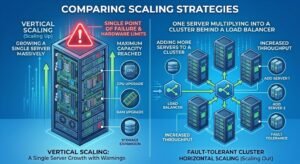
Vertical scaling involves making your existing server physically larger and faster. If a database server is running out of memory, you open the chassis and upgrade it from 64GB of RAM to 256GB of RAM. If the CPU is bottlenecking, you replace it with a higher-frequency, higher-core-count processor.
The primary advantage of vertical scaling is simplicity; the application architecture does not need to change because it is still running on a single machine. However, vertical scaling is bounded by the physical limits of motherboard architecture (e.g., a server can only hold a maximum of 2TB of RAM). Furthermore, scaling up requires downtime (you must turn the server off to upgrade the CPU), and the cost scaling is non-linear. Upgrading from a $2,000 processor to a top-tier enterprise processor might cost $15,000 for only a 30% performance gain. Eventually, you hit a hardware ceiling where no amount of money can buy a faster single machine.
Horizontal Scaling (Scale-Out) Complexities
Horizontal scaling involves adding more servers to a resource pool rather than upgrading a single server. Instead of upgrading one web server to have 128 cores, you deploy ten smaller web servers, each with 16 cores, and place a Load Balancer in front of them to distribute incoming traffic.
Horizontal scaling provides virtually infinite scalability and immense fault tolerance (if one server dies, the load balancer simply redirects traffic to the other nine). However, it introduces massive software complexity. Your application must be explicitly programmed to run concurrently across multiple machines.
The Challenge of Managing State
The biggest hurdle in horizontal scaling is managing “state.” If a user logs into Web Server A and adds an item to their shopping cart (the state), and their next click is routed by the load balancer to Web Server B, Web Server B has no idea who the user is or what is in their cart. To scale horizontally, applications must become “stateless,” pushing all user session data to a centralized, highly available, and fast-caching database (like Redis or Memcached) that all web servers can read simultaneously. Transitioning a monolithic legacy application to a stateless, horizontally scaled architecture is often a multi-year engineering project.
Designing for Elasticity and Future Growth
To overcome the challenges of scaling and to fully utilize modern infrastructure, IT departments must adopt contemporary deployment methodologies. Elasticity is not just about scaling up when traffic spikes; it is equally about scaling down instantly when traffic subsides to save costs.
Containerization and Microservices
The era of installing an application directly onto a monolithic operating system is over. Modern infrastructure relies on containerization (using tools like Docker). A container packages the application code, its libraries, and its dependencies into a single, isolated, lightweight unit. Unlike full Virtual Machines (VMs), containers share the host’s operating system kernel, making them incredibly fast to boot—often starting in milliseconds.
When paired with an orchestration platform like Kubernetes, infrastructure becomes highly elastic. If CPU utilization on your checkout application spikes above 80%, Kubernetes can automatically spin up five new containers of that specific microservice, route traffic to them, and then automatically destroy them when the CPU utilization drops back below 30%. This decoupling of application logic from the underlying hardware is the foundation of modern infrastructure planning.
Infrastructure as Code (IaC) and Automation
Managing a horizontally scaled environment with hundreds of servers manually via command-line interfaces is a recipe for catastrophic configuration drift and human error. Infrastructure planning today requires Infrastructure as Code (IaC).
Using declarative languages and tools like Terraform or Red Hat Ansible, systems engineers write code that defines what the infrastructure should look like. To deploy a new web cluster, the engineer does not log into a hypervisor and click through menus. Instead, they execute a script, and the IaC tool automatically provisions the virtual networks, builds the VMs, configures the firewalls, and deploys the load balancers exactly as defined in the code. This ensures absolute consistency, rapid disaster recovery, and the ability to version-control the entire data center architecture through Git repositories.
Network and Storage Bottlenecks in Scaling
When planning for scale, engineers often focus heavily on CPU and RAM, neglecting the network and storage pathways that must carry the increased load. A cluster of 100 web servers is useless if the core database storage cannot process the aggregate read/write requests.
Bandwidth Exhaustion and Edge Computing
As you scale out user-facing applications, the central data center’s internet uplink can quickly become saturated. To mitigate this, enterprise scaling strategies heavily utilize Content Delivery Networks (CDNs) and Edge Computing. By caching static assets (images, videos, HTML files) on CDN nodes located in dozens of cities globally, you offload massive amounts of bandwidth from your origin infrastructure.
Scaling Storage: The Shared-Nothing Architecture
Storage is notoriously difficult to scale horizontally. If 50 database nodes all try to write to the exact same SAN volume simultaneously, file locking mechanisms will cause massive latency queues. Modern scaling relies on “Shared-Nothing” architectures, utilizing distributed NoSQL databases like Apache Cassandra or MongoDB. In this architecture, data is partitioned and distributed across dozens of independent storage nodes. No single node shares RAM or disk space with another, allowing read and write operations to scale linearly simply by adding more commodity servers to the cluster.
Frequently Asked Questions
1. What is the difference between Scalability and Elasticity?
Scalability is the infrastructure’s ability to increase capacity to handle a growing workload, typically a planned expansion over time. Elasticity is the infrastructure’s ability to autonomously and dynamically scale out (expand) and scale in (contract) in real-time in response to sudden, unpredictable traffic spikes, ensuring you only pay for what you use.
2. Why is vertical scaling considered a dead end for modern web applications?
Vertical scaling is bound by the strict physical limitations of hardware (maximum RAM, maximum PCIe lanes). Furthermore, relying on a single massive server creates a catastrophic Single Point of Failure (SPOF). Modern web applications prioritize high availability, which necessitates a horizontally scaled, multi-node architecture.
3. How does Infrastructure as Code (IaC) prevent configuration drift?
Configuration drift occurs when administrators make manual, undocumented changes to individual servers over time, causing them to deviate from the standard baseline. IaC prevents this because all changes must be made in the central code repository and deployed programmatically. If a server’s configuration drifts, the IaC tool will automatically overwrite the manual changes to enforce the declared code state.
4. What is a microservices architecture?
Instead of building one massive application (a monolith) where the user interface, checkout, and inventory systems are tightly coupled, a microservices architecture breaks the application down into independent, containerized services. This allows the engineering team to horizontally scale just the “checkout” service during a sale, without wasting resources scaling the “user profile” service.
Authoritative Sources & References
-
Amazon Web Services (AWS) Well-Architected Framework: Reliability and Performance Efficiency Pillars
-
Google Cloud Architecture Center: Capacity Planning and Load Balancing Strategies
-
The Linux Foundation: Kubernetes and Cloud Native Operations
-
HashiCorp Documentation: Infrastructure as Code (IaC) Principles with Terraform