VLAN Design Principles for Secure and Organized Networks
Modern networks are becoming increasingly complex. Companies use the same infrastructure for desktop computers, mobile devices, servers, cloud applications, security systems, and smart devices. Without a sound architecture, network traffic can become unmanageable, insecure, and difficult to recover. Virtual LANs (VLANs) offer an effective approach to network architecture. Administrators can use VLANs to divide a physical network into multiple logical networks without purchasing new hardware for each network group.
A well-designed VLAN structure can reduce unnecessary communication, improve performance, and simplify network management. However, poorly planned VLANs can lead to chaos, security vulnerabilities, and operational issues. This article explains VLAN design concepts, how VLANs work, the importance of segmentation, and practical considerations for network administrators when building a secure and organized network.
Modern VLAN Design for Networks: Why It Is Crucial
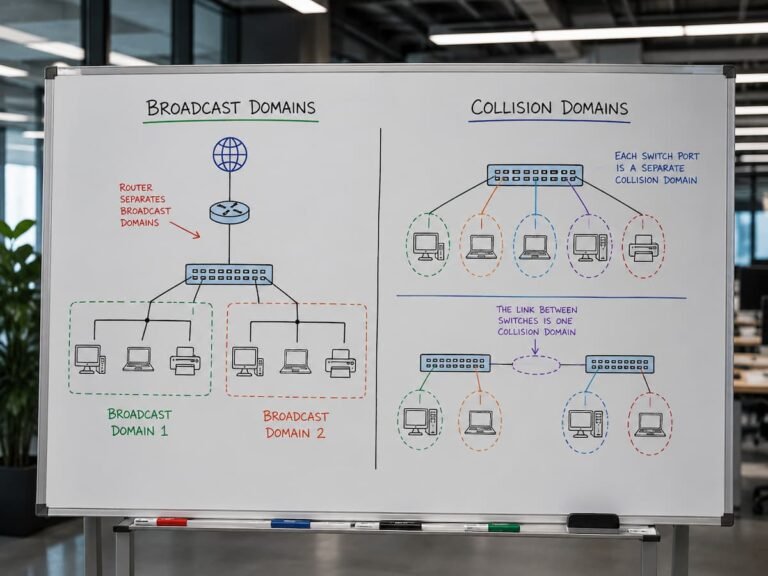
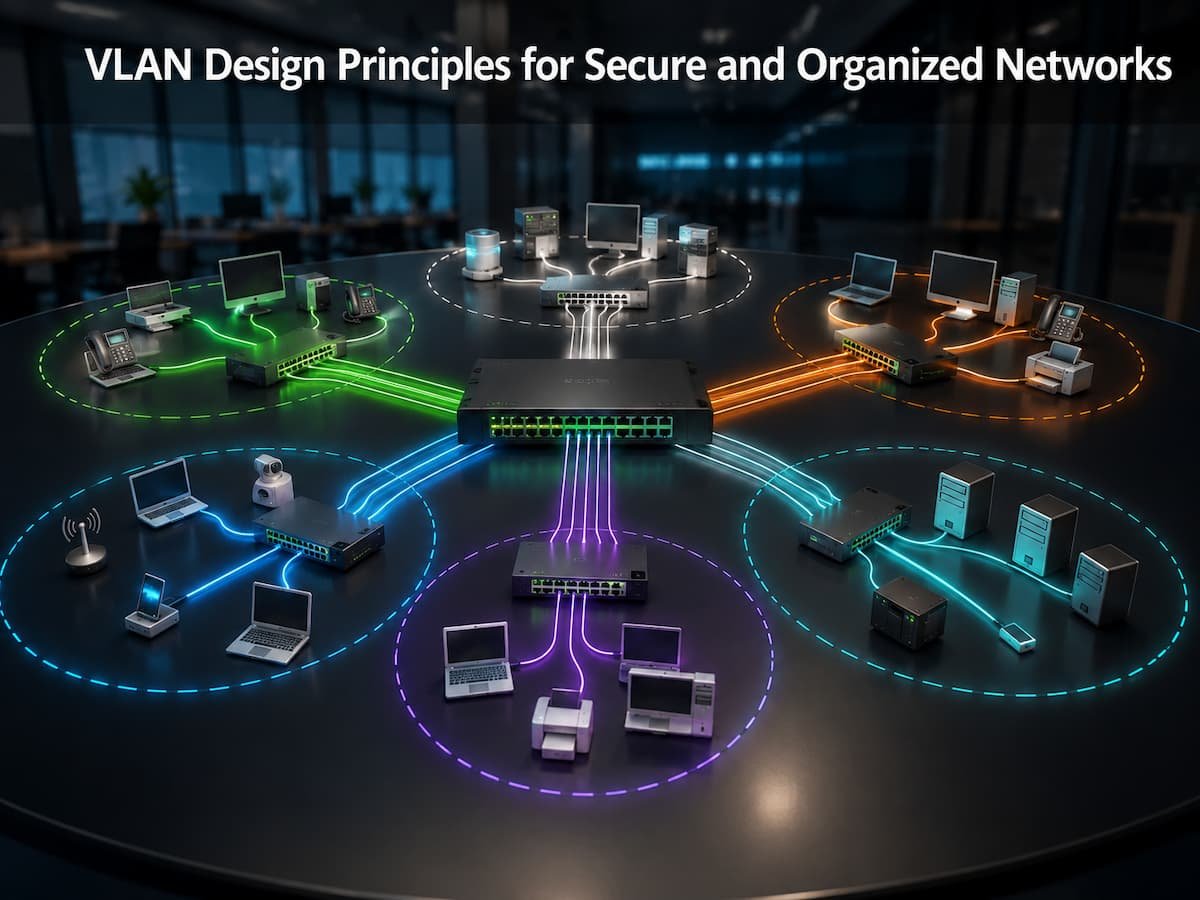
A simple network might have just one broadcast domain for all devices. This allows devices within the same network segment to communicate and enables broadcast traffic to reach multiple systems without duplication. While small networks can handle this, large networks become difficult to manage. Employees, visitors, servers, surveillance cameras, printers, and management systems may all share the same infrastructure. Placing all these devices on the same network increases risk and management complexity. VLANs solve this problem through logical isolation; the same physical switch can connect devices across different virtual networks. Companies can create separate VLANs for the following purposes:
- Employee computers
- Wireless access servers for guests
- Voice communication systems
- Security devices
Rules, access controls, and security policies can vary by VLAN. This helps administrators organize communication between devices. VLAN design involves more than just adding networks; the goal is to achieve significant isolation in terms of security, performance, and management.
Understanding VLANs and Network Segmentation
Logical networks are formed within a physical network architecture known as VLANs. Devices may connect to the same physical switch, yet VLAN settings isolate the devices and their traffic. Physical connections are a key component of traditional networks, where administrators must provide separate switches or devices for different networks. Configuring VLANs enables logical isolation, thereby overcoming this limitation. VLANs facilitate network segmentation, which involves dividing a large network based on purpose, security, or function.
Simple VLAN Example
| Department | VLAN Purpose | Example Devices |
|---|---|---|
| Finance | Protect sensitive business systems | Employee computers and financial applications |
| Guest Network | Provide internet access without internal access | Visitor devices |
| IT Management | Administrative control | Network management systems |
| Voice Network | Support communication services | IP phones |
The advantage of this approach is control. A guest device connected to the guest VLAN does not automatically have access to internal business systems. Similarly, security cameras can operate separately from employee computers. However, VLANs do not provide complete security by themselves. They create separation, but additional controls such as firewalls, access rules, and monitoring are required for strong protection.
Planning VLAN Structure Before Implementation
One of the most important VLAN design principles is planning before configuration. Many network problems happen because VLANs are created without a clear purpose. A good VLAN structure should be simple enough to manage but detailed enough to provide useful separation. Creating too few VLANs can reduce security, while creating too many can make administration unnecessarily complicated. Before creating VLANs, administrators should understand:
- Which devices need to communicate with each other
- Which systems require additional protection
- Which traffic should remain separated
- How the network may grow in the future
Design VLANs Around Business Requirements
VLANs should usually reflect operational needs rather than only physical location. For example, two employees in different offices may still belong to the same department and require similar network access. A company may create VLANs based on:
| Design Approach | Example | Benefit |
|---|---|---|
| Department-Based | Finance, HR, Sales | Easy access management |
| Function-Based | Servers, Voice, Printers | Better technical organization |
| Security-Based | Critical systems separated from normal users | Improved protection |
The best design often combines multiple approaches. For example, a business may separate servers based on security requirements while keeping user devices organized by department.
Using VLANs to Improve Network Security
Security is one of the biggest reasons organizations implement VLANs. A flat network allows devices to communicate more freely, which increases the potential impact of security incidents. If malware reaches one device in a flat network, it may attempt to spread to other systems. Network segmentation reduces this risk by limiting unnecessary communication between groups of devices. For example, employee computers usually do not need direct access to security cameras, guest devices, or network management equipment. Separating these systems into different VLANs creates additional protection.
VLANs and Access Control
VLAN separation becomes more powerful when combined with access control policies. Administrators can define exactly which VLANs are allowed to communicate.
| Source VLAN | Allowed Access |
|---|---|
| Guest VLAN | Internet access only |
| Employee VLAN | Business applications and approved resources |
| Management VLAN | Network administration systems |
This approach follows the principle of least privilege. Devices receive only the access they actually need.
Warning: A VLAN alone does not stop attacks. Security improves when VLAN segmentation is combined with firewalls, authentication, monitoring, and proper access policies.
Managing Network Traffic Through VLAN Separation
Besides security, VLANs also improve network performance by reducing unnecessary broadcast traffic. In large networks, excessive broadcasts can consume bandwidth and make troubleshooting more difficult. When devices are separated into different VLANs, broadcast traffic stays within its own segment instead of reaching every connected device.
For example, a company with hundreds of computers, printers, and smart devices can reduce unnecessary traffic by separating these systems into appropriate VLANs. This creates a more efficient network where important applications receive better access to available resources.
Common VLAN Types and Their Purpose
VLANs are not all created for the same purpose. Different VLAN types are used to organize traffic based on function, security requirements, and network operations. Understanding these categories helps administrators create cleaner and more effective network designs. Although organizations may name VLANs differently, the following types are commonly used in professional network environments.
| VLAN Type | Purpose | Typical Usage |
|---|---|---|
| Data VLAN | Separates normal user traffic | Employee computers, laptops, workstations |
| Voice VLAN | Handles voice communication traffic | IP phones and communication systems |
| Management VLAN | Protects administrative access | Switches, routers, firewalls, monitoring tools |
| Guest VLAN | Provides isolated external access | Visitors and personal devices |
| Server VLAN | Separates important application systems | Database servers, application servers |
A common mistake is placing every device into a general-purpose VLAN. While this may seem easier initially, it reduces visibility and makes security management more difficult as the network grows.
How VLAN Communication Works Between Networks
One important concept beginners often misunderstand is that devices in different VLANs cannot communicate directly by default. Each VLAN acts as a separate logical network. If a device in one VLAN needs to communicate with a device in another VLAN, the traffic must pass through a Layer 3 device such as a router or Layer 3 switch. This process is known as inter-VLAN routing.
Example of Inter-VLAN Communication
| Device | VLAN | Required Access |
|---|---|---|
| Employee Computer | Employee VLAN | Access internal applications |
| Application Server | Server VLAN | Provide approved services |
| Guest Device | Guest VLAN | Internet only |
A firewall or Layer 3 switch can control which VLANs are allowed to communicate. For example, employees may access application servers, but guest users should not have access to internal systems. This controlled communication is one of the biggest advantages of VLAN design. Instead of allowing all devices to communicate freely, administrators create specific rules based on business requirements.
Best Practice: Allow only the communication that is necessary. Every unnecessary connection between VLANs increases security risk.
Common VLAN Design Mistakes
A properly designed VLAN structure will increase security and organization, while poor planning might bring new challenges. Most network problems are caused by faulty implementation of VLANs, not by the limitations of the technology.
1. Creating Too Many VLANs:
Segmentation is useful, but too much of it can make the network difficult to administer. You can create hundreds of useless VLANs, but that will only increase the labor of admins without any real value. A smart VLAN design provides separation when it adds to security or management but does not add needless complexity.
2. Default VLAN Settings Without Changes:
Many network devices have default VLAN configurations. Default settings can leave crucial systems more vulnerable to attack or misconfiguration. Administrators should review default settings and put suitable security measures in place before deploying networks.
3. Poor VLAN Naming Conventions:
By giving them clear names, administrators can tell what the purpose of each VLAN is. Troubleshooting using names like “VLAN10” or “VLAN20” is not very informative. Using a more structured naming convention such as “Finance_Data” or “Guest_Wireless” makes things clearer and less prone to errors.
4. Ignoring the Documentation:
Documentation of the network is sometimes ignored, but it is important for long-term reliability. Without the right documents, future administrators may have a hard time figuring out why the VLANs were created or how the systems are connected. Good documentation should provide vlan purposes, ip ranges, access rules, and linked devices.
Stable VLAN Design Best Practices
VLAN design is not just about creating different networks. This is about building a framework that is safe, clear, and flexible as the company grows.
- Keep VLAN Design Simple and Logical The finest VLAN topologies are simple and intuitive. Each VLAN should have a reason, and the administrators should be able to justify why it exists; this approach is best practice. Complex designs increase troubleshooting time and create more chances for configuration problems.
- Critical Systems Separation: “Important infrastructure should not be on the same VLAN as normal user devices.” Servers, management systems, security equipment, and sensitive applications may need extra protection.
- Apply Security Controls Between VLANs: Inter-VLAN communication should be very strictly monitored. Firewalls and access policies should describe what traffic is allowed and what traffic should be banned.
- Review VLAN Design: Reviewing a VLAN design is a normal activity. Monitoring your network might uncover odd traffic, unwanted access, and configuration problems.
Future Trends in VLAN and Network Segmentation
As companies embrace cloud services, remote work, IoT devices, and automation systems, networks are becoming increasingly dynamic. Traditional VLAN design remains valuable, yet modern environments increasingly demand more flexible approaches to network segmentation. Software-defined networking (SDN) and Identity-based Access Control (IaQS) extend the concept of network segmentation beyond physical network locations. Future networks will no longer rely solely on VLAN membership; instead, they will be able to make access decisions based on users, devices, applications, and security status.
However, the fundamental principles of VLAN design remain crucial. Resource isolation, the reduction of unnecessary communication, and access control continue to form the foundation of secure networks. A well-planned VLAN architecture establishes a solid base for future technologies. Companies that understand the principles of network segmentation can more easily adapt to changing network requirements.
Conclusion
VLAN design is a crucial aspect of building a secure and organized network. By logically isolating devices, organizations can better manage communication, enhance security, and create a more manageable infrastructure. The most effective VLAN design is based on careful planning. Administrators must create VLANs based on business needs, protect critical systems, manage communication between network segments, and avoid unnecessary complexity.
VLANs are more than just a technical configuration; they provide a way to bring structure to an ever-growing network environment. Well-designed VLANs offer a reliable foundation that supports security, scalability, and future network enhancements.
FAQs
1. What is the primary purpose of VLANs?
The primary purpose of VLANs is to divide a physical network into independent logical networks. By determining which devices can communicate with one another, VLANs can improve organization, security, and performance. VLANs enable companies to isolate users, servers, guests, and specific systems without the need for completely separate physical networks.
2. Is a VLAN a security feature?
VLANs enhance security by creating network isolation, but they do not constitute a complete security solution on their own. VLANs are most effective when combined with firewalls, access control policies, authentication systems, and monitoring tools. While VLANs can reduce unwanted communication, they do not automatically prevent all attacks.
3. Can devices in different VLANs communicate with each other?
Devices in different VLANs can only communicate via routing. Traffic between VLANs must be handled by a Layer 3 switch or router. Administrators can apply security rules to determine which VLANs are permitted to exchange information.
4. How many VLANs should a network have?
There is no one-size-fits-all number of VLANs for every organization. The appropriate number depends on security requirements, network size, applications, and management needs. Too few VLANs compromise security, while too many create unnecessary complexity.
5. Do VLANs improve network performance?
VLANs can enhance performance by reducing broadcast traffic and organizing network communication more effectively. However, the primary benefit is usually improved control and management, rather than an automatic increase in network speed.
6. Should guest devices use separate VLANs?
Yes, guest devices should generally be placed in a separate VLAN. Guest networks typically require internet access but should not have direct access to internal corporate systems. A separate VLAN, combined with appropriate firewall rules, can improve security and mitigate risks.
7. Why is VLAN documentation important?
Documentation helps administrators understand the purpose and configuration of each VLAN. As the network grows and teams change, clear documentation can prevent errors, accelerate troubleshooting, and simplify future upgrades.
References
- Cisco Networking Academy – Networking fundamentals and VLAN concepts
- IEEE Standards Association – Ethernet networking standards and technologies
- National Institute of Standards and Technology (NIST) – Network security guidance
- Juniper Networks Documentation – VLAN configuration and network segmentation concepts
- Arista Networks Documentation – Enterprise network design resources